


DVI – Overview of the Homepage & Status Column
The home page of our digital vehicle inspection software is the one place you can get a quick overview of what’s happening in your shop. It looks like this:
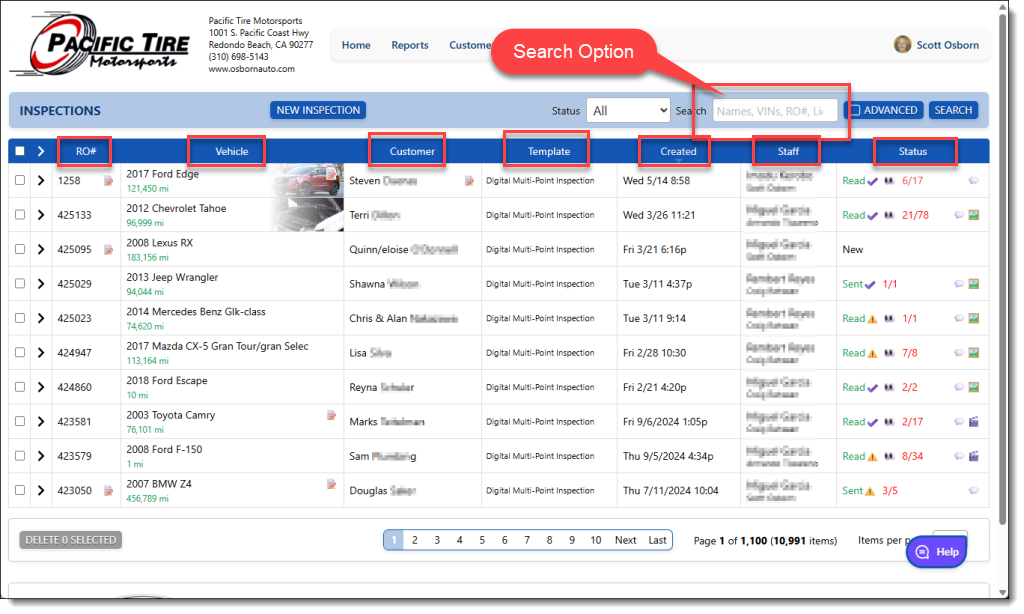
Each row is one of the last 10 inspections in the system. No need to delete or archive them, they just fall off the bottom of the page as you add new ones. They are always available by the search option too. For each row, you can see the RO number, vehicle info, mileage, customers name, which template was used, the date it was started, who is assigned to each inspection, and our status column.
The status column gives you a quick look at the status of each inspection:
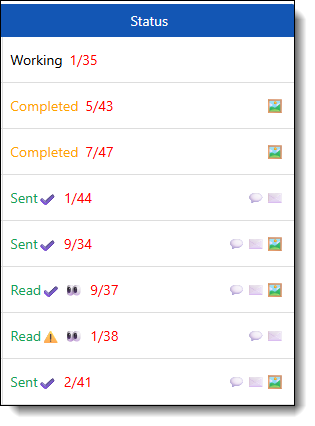
Hold your mouse over any icon for more info:
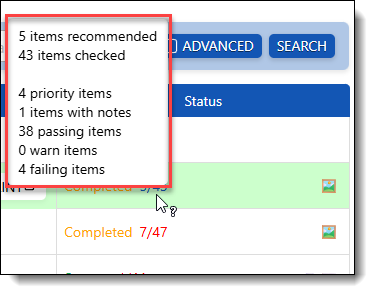
The options are:
New – the inspection has been created but has not been started by the Tech yet.
Working – The tech has started working on the checklist but has not yet marked it as completed.
Completed – The tech has marked the inspection as completed.
Audited – The inspection has been reviewed for spelling and grammar, the priorities have been verified, and the images have been reviewed. It is ready to be sent to the customer.
Sent – It has been sent by either email or text message to the customer
Read – The inspection has been viewed by the customer
The icons represent:
 This inspection has identified 5 items that require service, out of a total of 43 items checked.
  This inspection has been audited, checked for grammar, spelling and images reviewed.
 This inspection was sent to the customer without being audited.
 This inspection has been viewed by the customer.
 This inspection was sent to the customer via text.
 This inspection was emailed to the customer.
 This inspection includes images.
 This inspection includes video.

A status like this would indicate an inspection with 37 checked items, 9 recommendations, it has photos, it has been texted and emailed to the customer and the customer has viewed it on their phone.
Any inspection that has been saved without all mandatory items being checked will be considered incomplete.