


Texting Menu Options
(back)
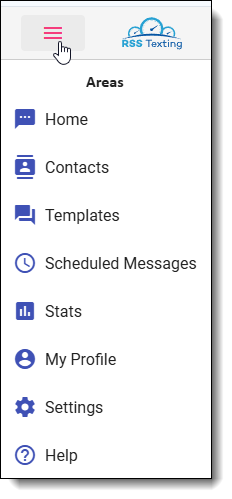
Here’s a look at the different menu options in the new texting program. Clicking the 3 dashes in the upper left corner brings up the menu.
- Home and the RSS Logo will both take you back or reload the home screen.
- Contacts – This option gets you to a listing of all of your contacts. It’s easy to edit contacts, upload existing contact lists, or to merge in case you have duplicates.
- Templates – This section is where you can add or edit your list of templates. We’ll go into detail on that in an upcoming email.
- Scheduled Messages – If you’ve been setting messages up to be delivered on a future date, you can easily see what’s scheduled here. You will be able to edit or delete them to ensure you’re not sending messages to someone you don’t want to.
- Stats – Want to see how many message units you’ve used so far this month?
- My Profile – Use this to change your username, email address, password, or cell phone number
- Settings – If you are the Owner, you have options to change the shops information, time zone, default time scheduled messages are sent, and to add/edit/disable users.
- Help – This will take you to our help section with detailed information regarding the texting program
(back)