


DVI – Adding an Overview Video to an Inspection
Many shops now do an initial walkaround with the vehicle either before reviewing the customer’s concerns or to show the customer what they found during today’s inspection. If you plan to add a video of the vehicle to your digital inspection that includes a walkaround and an explanation of what you find, we have some tips. We suggest you get one person in the shop who can speak clearly and with authority, train them to take the video, and then review it before adding it to the DVI.
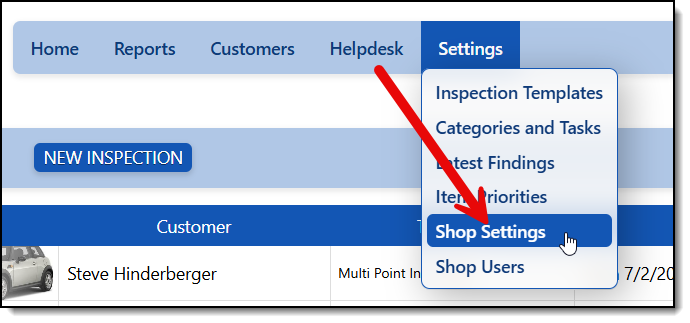
First, let’s set up your RSS to take those videos. Go to Settings/Shop Settings
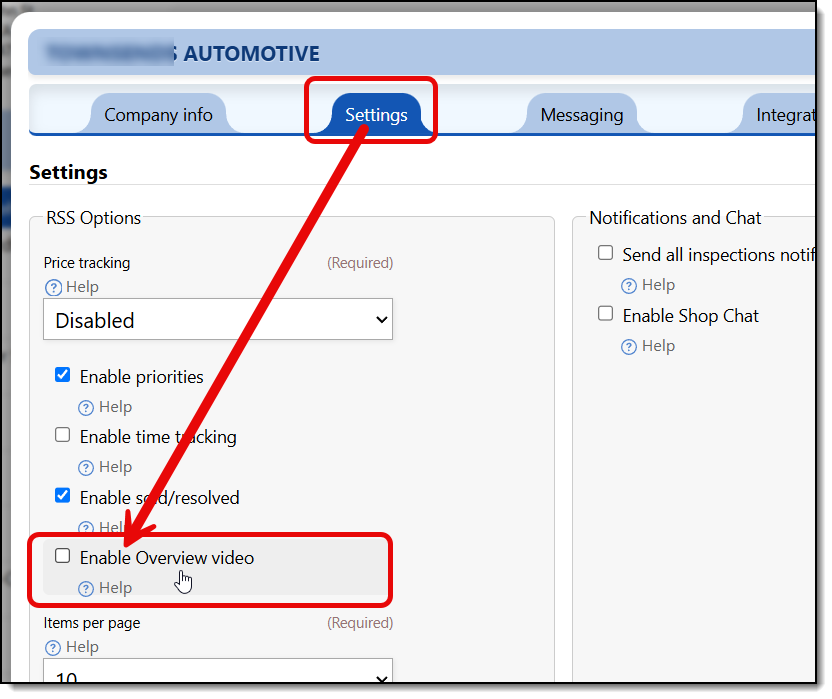
From the settings screen, select the settings tab and then check the option for “Enable Overview Video”
Once you enable that and save the changes, every checklist will include a new category for adding an Overview Video.
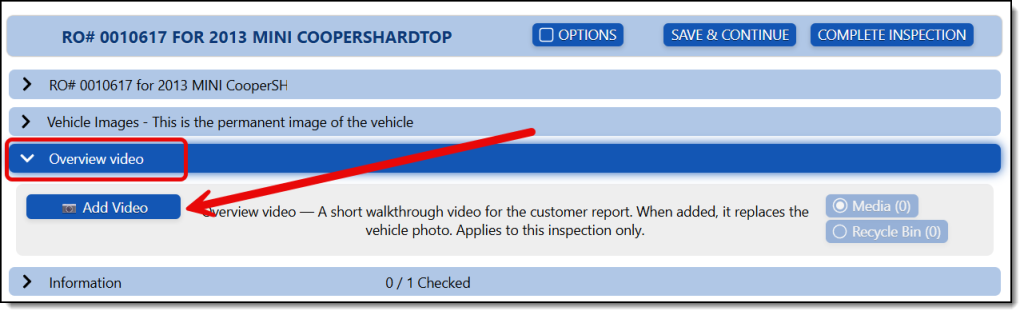
When you add a video here, it will be used only for this one inspection and will replace the vehicle’s top image with the video. The next time the vehicle comes in, it will default to an existing vehicle photo unless you take a new video.
Practice makes perfect. Review your video before sending it to the customer. The idea is pretty powerful, but background noise, language, loud radio music, etc. can ruin it quickly. We recommend using the app “CapCut” to edit your videos before sending them. Check the Apple or Android stores for the app.
Our system accepts videos up to 1GB (1024MB), but you may need to take a few steps to ensure a smooth upload. Here are our recommended requirements for uploading large video files:
To upload large videos successfully, we recommend using an updated phone, tablet, or computer with a strong internet connection.
You can use:
- iPhone or iPad: iOS/iPadOS 23 or newer.
- Android: Android 15 or newer.
- Computer: Updated Chrome or Edge. Safari may also work, but Chrome or Edge is recommended for large videos.
Important recommendations:
- You will do much better with a strong 5G Wi-Fi signal
- If using mobile data, make sure you have a strong signal
- For best results, keep the upload page open until the video finishes uploading
- Avoid locking your phone, closing the browser, or switching apps during the upload.
- Avoid using private/incognito mode.
- Make sure your device has enough free storage.
- If your browser asks for notification permission, allow notifications so the upload progress works better.
Video size:
You can upload large videos up to 1 GB on supported devices and browsers.
On older devices or browsers, very large videos may fail. If that happens, try a different browser, device, or a more stable Wi-Fi connection.
Recommended video format:
MP4 video.
Always follow a script. Here’s a sample:
“Good morning, Bob! This is Kevin over at Downtown Motors, and I wanted to give you a quick overview of your 2021 Chevrolet Malibu while it’s in the shop today.
First off, thank you for bringing it in. We’ve completed the oil service portion of your visit and also inspected the brake system to address the squeal you mentioned when coming to a stop.
As part of your digital inspection, we checked the condition of the brake pads and rotors, looked for uneven wear, and reviewed the surrounding brake components to ensure everything is operating safely and smoothly.
We also performed a full multi-point inspection, including the tires, battery, fluid levels, filters, suspension components, and other key systems. Overall, your Malibu is in very good shape and appears to have been well maintained.
As you continue through the inspection report, you’ll see photos and notes from our technician so you can clearly see what we’re seeing out in the shop. If there are any recommendations, we’ll explain what needs attention now, what may need monitoring later, and answer any questions you may have along the way.
Here at Downtown Motors, we want to make vehicle maintenance easy, transparent, and stress-free.
We appreciate the opportunity to take care of your Malibu today, Bob, and please let us know if there’s anything else we can help with.”