


Group Texting
(back)
Working with Group Text Messages:
Sometimes we need to send a message to several people, or a group. Think husband and wife, your employees, etc. RSS Texting offers that option. To create a group, click the “Add Person” icon under the first name, enter the info, and press add.
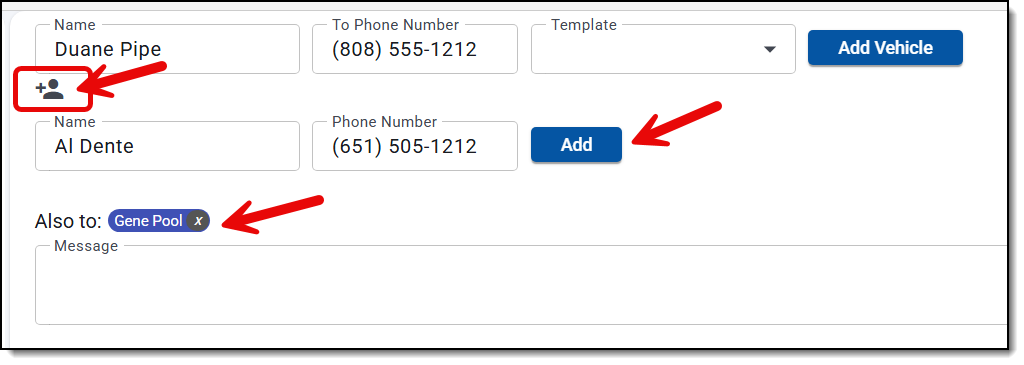
Here’s how it all works:
Group texting
- A message can go to the main customer plus up to 8 more people. Recipients can be picked from existing contacts by name. Typing a new name and number creates a new contact automatically.
- Sending again to the same set of people continues the same group thread.
- Group threads show in the conversation list with their member count. Replies show who sent them, and an incoming group reply triggers the usual notification and sound.
- Replies to a group appear only in the group thread, not also in the sender’s 1:1 conversation.
- Group texts can only be sent from a shop’s US or Canadian local number. Carriers don’t support group texts from toll-free numbers.
Opted-out recipients
- If someone texts STOP, including from inside a group thread, they’re marked as opted out. Every contact record with that phone number is marked, not just one. Texting START reverses it.
- In testing, when one member of a group had opted out, the carrier rejected the group message for every member. So the app now blocks the send up front:
– Send is disabled, with a banner naming who has opted out.
– A new group can’t be created with an opted-out member.
– An opted-out number can’t be added as a recipient. - A scheduled group message that comes due after a member has opted out isn’t sent. It’s marked failed, and the reason shows in the thread.
- Group messages can be scheduled like 1:1 messages.
- At send time, a scheduled message isn’t sent if the main contact is now inactive, the group is no longer active, or a member has opted out. The thread shows it as failed, with the reason.
Delivery status
- Each group message shows delivery status for each recipient (Sent, Delivered or Failed). A failure for any recipient raises an alert naming that recipient.
Attachments
- Outgoing group attachments are limited to 2 MB each.
- Incoming images, videos and PDFs are accepted. SVG images are blocked because they can contain scripts.
- Phones and carriers shrink large photos and videos before they’re sent. In testing, an 11.5 MB photo and a 100 MB video both arrived as about 1 MB.
(back)