


DVI – Inspection Template Basics
If you’re new to the digital vehicle inspection world, you may want to start making changes to our Multi-Point inspection template right away. Techs get a first look at it and are overwhelmed by the number of items in the checklist; you want to “clean it up” by removing a bunch of items you probably won’t need. After all, who doesn’t want to make the process faster and simpler than paper?
What you may not understand yet is that when you go digital, you don’t have to check every line item. In fact, you don’t want to. Keep in mind that when a customer views the report, it only shows the items you checked off. They don’t see anything that went unchecked.
It’s no wonder techs get really upset when they’re used to a 35-45-point inspection, and then you hand them a 200-point inspection on a new system. They don’t realize that with a digital inspection, you are expected to skip most items. Many are there only as needed.
Please try it out before you start adding items to the checklist. The multi-point is designed to save time by allowing users to answer simple questions like:
- “All Lights Working?” rather than clicking a button for each individual bulb.
- “Dash indicator lamps OK?” rather than a whole list of possibilities
We also save time by having the user give more info to the service writer, such as:
- Are belts serpentine or V-belts
- How many belts are there
- What size/manufacture tires does it need (if it needs tires)
- If the vehicle has both rear drum and disc brakes, the user selects only the ones on the vehicle, which helps the advisor know what type of rear brakes are on the car when ordering front pads.
- No need to mark things as “N/A” or “Did not check”. This makes it easier for the advisor to get through the info and makes each checklist a customized list of only what was checked.
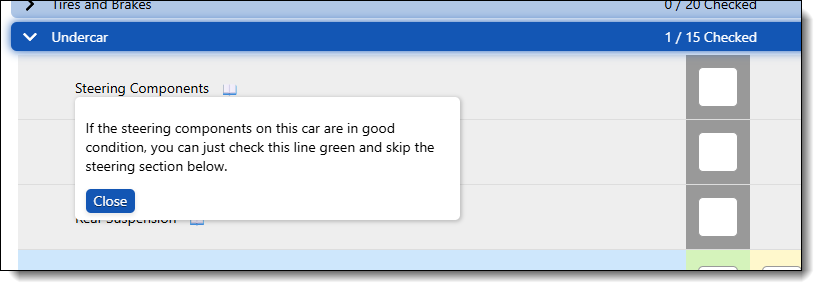
We also have shortcuts for the techs. For example, the tire size is only needed if they recommend tires. If they check off that the steering is Ok in the undercar section, they can skip the whole steering section.
If you still want to change your templates, go ahead. It is fully customizable. Keep in mind that a template is just a collection of existing categories and tasks, in the order they appear in the master list.
If you’re ready to jump in, go to our “Editing Templates” page.