


DVI – Integrating With Your Management System
For the supported Shop Management Programs, we’ve created a program that will run on your local server or connect to your online systems’ server and send us your list of current repair orders and required information, so we can have it in the system when a user is ready to perform an inspection. To see if it is already set up, click on the “New Inspection” button just below the menu bar:
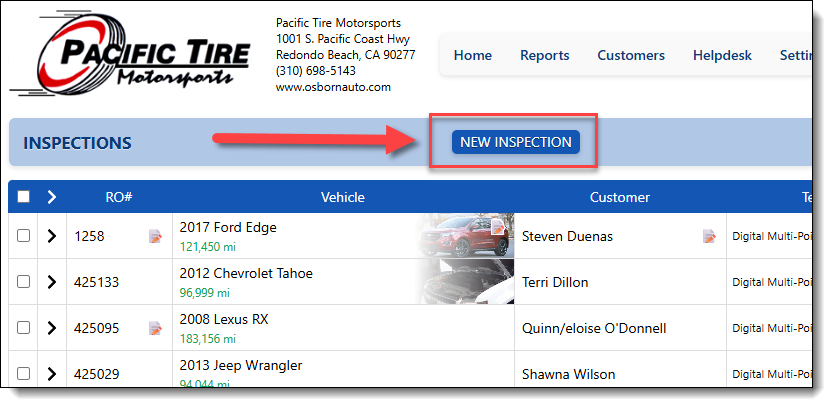
If the integration has already been set up, this brings up a pop-up window showing you the repair orders for the cars that are in your shop today:
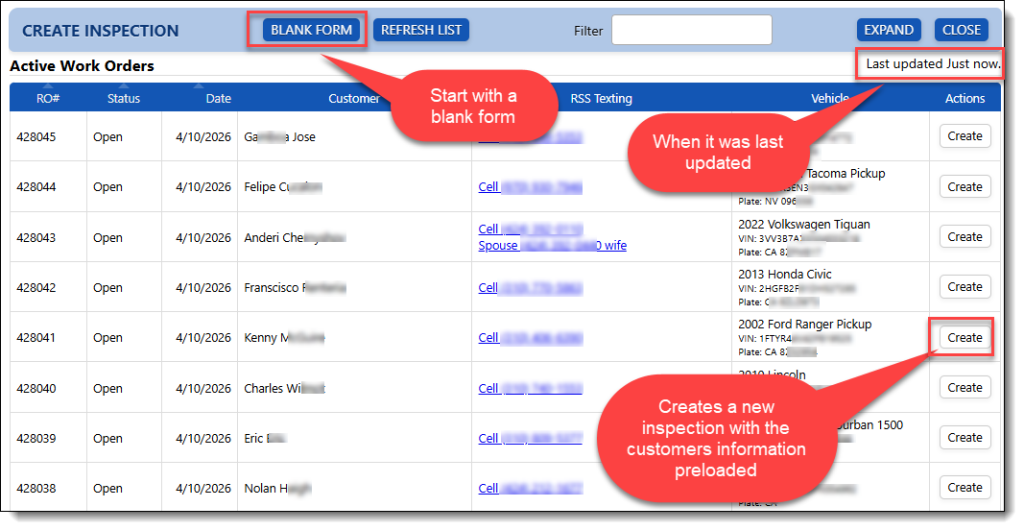
- Shows your current Repair Orders (the list is updated every 60 seconds by default).
- The “Create” button allows the user to create a new inspection for this vehicle.
- For large shops, the search feature will help find the car you want to inspect
- The blank form allows you to start a new inspection by entering info that may be missing
If your shop has not yet set up the integration, you will see a blank form to start a new inspection. To set up your shop with integration of a supporting system, give us a call at (424) 262-1580 or schedule a 30-minute online session at https://calendly.com/rssdemo.