


DVI – Making Mileage Mandatory
We’ve seen many shops that don’t include mileage on invoices and inspection reports, which makes it hard to have a meaningful conversation with customers and recommend items without knowing their car’s mileage. Forget legalities of getting it on the paperwork; it should be the first thing you look at, so you’re not guessing on potential maintenance work. I can’t tell you how many inspections I see where items are recommended by “age or mileage,” and there’s no mileage on the inspection.
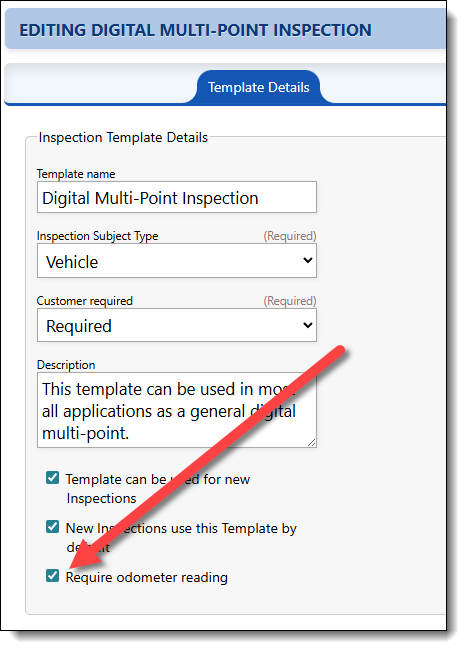
When a Tech starts an inspection, the mileage is pulled from the repair order, and in the new inspection list, you can see whether it has mileage. If it does not, the Tech can update that as they create the inspection, or while they’re inspecting the vehicle. By default, a Tech does not have to enter mileage. But you can change that by editing the templates that you want to require mileage on. Under Settings/Template Setup, choose to edit the template you want to change and select the Require odometer reading option:
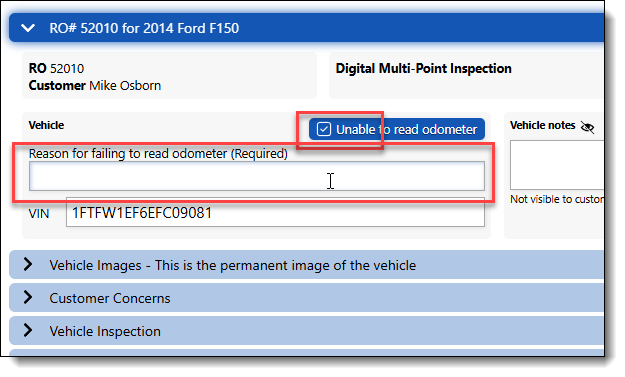
When the Tech is performing the inspection, they will be required to either enter an odometer reading or give a reason that it cannot be entered as shown here:
We hope this upgrade will help you get better inspections delivered to your customers and ensure transparency in your recommendations. As always, feel free to call or message us with any questions!